Resource files conventions (Prototypes and other)
YAML Conventions
- Every component
- typeshould be together without any empty newlines separating them - Separate prototypes with one empty newline.
name:anddescription:fields should never have quotations unless punctuation in the name/description requires the use of them, then you will use ‘’. For example:
  name: 'Spessman's Smokes packet'
  description: 'A label on the packaging reads, 'Wouldn't a slow death make a change?''
- Don’t specify textures in abstract prototypes/parents.
- You should declare the first prototype block in this order:
type>abstract>parent>id>categories>name>suffix>description>components. - Use inline lists for categories and regular lists for everything else:
- type: entity parent: [ PartHuman, BaseHead ] # Inline list id: Headhuman components: - type: Tag tags: # Regular list - Head - New components should not have an indent when added to the
components:section. This
Not thiscomponents: - type: Sprite state:components: - type: Sprite state: - The same rule applies for any other list or dictionary, for example:
- type: Tag tags: - HighRiskItem # Correct indentation - type: Tag tags: - HighRiskItem # Wrong indentation - When it makes sense, place more generalized/engine components near the top of the components list and more specific components near the bottom of the list. For example,
components:
- type: Sprite # Engine-specific
- type: Physics
- type: Anchorable # Content, but generalized
- type: Emitter # A component for a specific type of item
YAML and data-field naming
PascalCase is used for IDs and component names.
Everything else, even prototype type names, uses camelCase.
prefix.Something should NEVER be used for IDs.
Entities
Please ensure you structure entities with components as follows for easier YAML readability:
- type: entity
  abstract: true # remove this line if not abstract
  parent: <nameofparent>
  id:
  name:
  components:
  <rest of file>
Entity Prototype suffixes
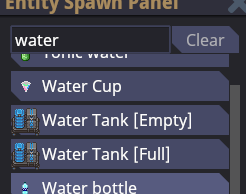
Use suffix in prototypes, this it’s a spawn-menu-only suffix that allows you to distinguish what prototypes are, without modifying the actual prototype name. You can use it like this:
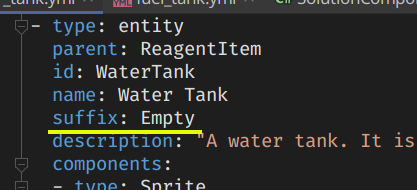
And results in this:
Localization
Every player-facing string ever needs to be localized.
Localization ID naming
- Localization IDs are always
kebab-caseand should never contain capital letters. - Localization IDs should be specific as possible, to avoid clashing with other IDs.
This
Not thisantag-traitor-user-was-traitor-message = ...traitor-message = ...
Sounds
When specifying sound data fields, use SoundSpecifier.
You should avoid defining sound paths directly and instead use SoundCollectionSpecifier whenever possible.
C# code example (click to expand)
[DataField]
public SoundSpecifier Sound = new SoundCollectionSpecifier("MySoundCollection");
YAML prototype example (click to expand)
# You can define a sound collection like this
- type: soundCollection
  id: MySoundCollection
  files:
  - /Audio/Effects/Cargo/ping.ogg

# And use it like this
- type: MyComponent
  sound:
    collection: MySoundCollection
Sprites and Textures
When specifying sprite or texture data fields, use SpriteSpecifier.
C# code example (click to expand)
[DataField]
public SpriteSpecifier Icon = SpriteSpecifier.Invalid;
YAML prototype example (click to expand)
# You can specify a specific texture file like this, /Textures/ is optional
- type: MyComponent
  icon: /Textures/path/to/my/texture.png

# /Textures/ is optional and will be automatically inferred, however make sure that you don't start the path with a slash if you don't specify it
- type: MyComponent
  icon: path/to/my/texture.png

# You can specify an rsi sprite like this
- type: MyOtherComponent
  icon:
    sprite: /Textures/path/to/my/sprite.rsi
    state: MySpriteState
RSI meta.json (click to expand)
- The order of fields should be
version -> license -> copyright -> size -> states. - JSON should not be minified, and should follow normal JSON quality guidelines (egyptian brackets, etc). All new JSON files should be indented at 4 spaces. Existing files should be changed to 4 space indent if you are modifying them (fix as you go). You should never be using tab for indent.
Example:
{
    "version": 1,
    "license": "CC-BY-SA-3.0",
    "copyright": "Taken from tgstation at commit https://github.com/tgstation/tgstation/commit/547852588166c8e091b441e4e67169e156bb09c1",
    "size": {
        "x": 32,
        "y": 32
    },
    "states": [
        {
            "name": "icon"
        },
        {
            "name": "equipped-BACKPACK",
            "directions": 4
        },
        {
            "name": "inhand-left",
            "directions": 4
        },
        {
            "name": "inhand-right",
            "directions": 4
        }
    ]
}